AI Assist
AI Assist is a chat assistant in the Lime CRM web client. Users open it from the Dock and ask about their CRM data in plain language. The assistant looks up the answer, within the user's permissions, and links every object it mentions.
Info
AI Assist is available in Lime Cloud. It is on by default, and the AI Assist setting in Lime Admin switches it off.
What AI Assist can do
- Answer questions about your data. "Which of my deals haven't been touched for 30 days?", "Summarize what we know about this company."
- Explain your setup. List the object types in the application and describe their fields, options and relations, using the display names your users see.
- Start from what the user is looking at. It knows which object card, list, filter or search is open, so "what should I do next here?" needs no explanation.
- Direct users to the objects they are looking for. Objects it names can be opened directly from the chat.
The assistant answers in the user's language.
What AI Assist cannot do
AI Assist is read-only.
- It does not create, update or delete objects, send emails, book meetings or start automations.
- It does not change anything in the user interface.
- It does not carry anything over between conversations. Each one starts fresh, though earlier conversations can be reopened from the history.
Permissions
AI Assist acts as the logged-in user and respects the same security policies, object access and record access rules as the rest of the web client. It can only read what the user can read, and object types the user has no access to are invisible to it.
There is no separate permission for AI Assist. When it is enabled, every user in the application gets the Dock button.
Conversations
Conversations are saved as the user chats, so they survive a page reload, and earlier ones can be reopened from the history.
Conversations are stored in your Lime CRM database and visible only to the user who had them. They are deleted 90 days after their last activity. The retention period cannot be changed, and users cannot turn saving off.
Enabling AI Assist
Go to Lime Admin ➡ System ➡ AI. The AI Assist setting applies to everyone in the application:
| Value | Meaning |
|---|---|
| Default (on) | Follow the system default, which is on. |
| On | Explicitly on. |
| Off | Explicitly off. Nobody in the application can use it. |
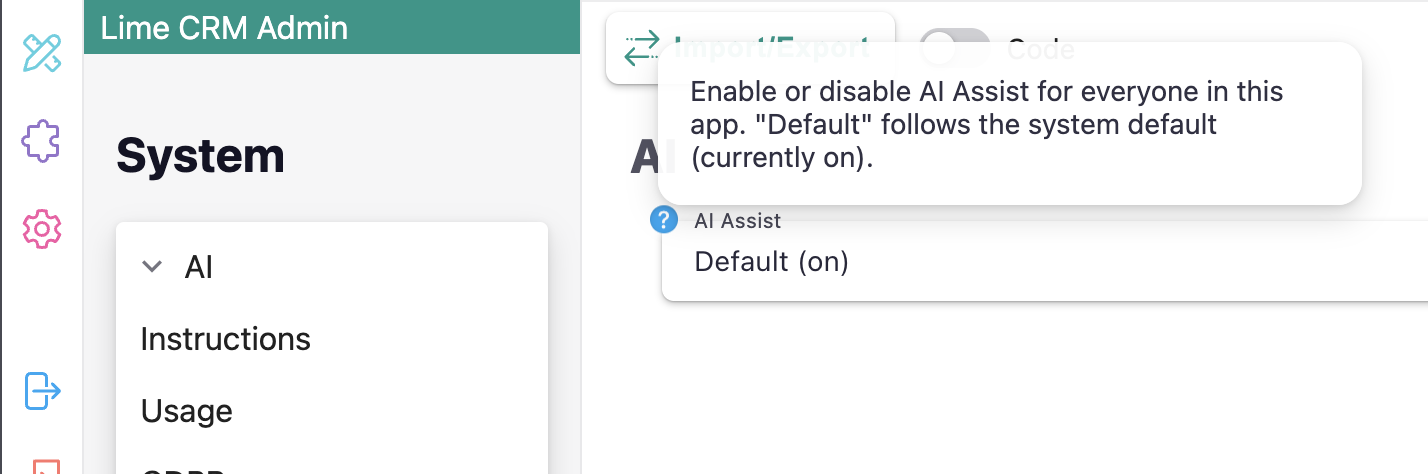
Unless the setting is Off, an AI Assist button appears in the Dock, and the chat opens as a resizable side panel or a bottom sheet on phones.
Customer-specific instructions
The Instructions section on the same page holds text that is added to the assistant's instructions in every conversation. Use it for what the assistant cannot learn from the data model:
- Your sales process stages and what happens at each step.
- How to interpret custom fields or statuses.
- Business rules, such as "deals over 50 000 require manager approval".
- Industry terminology and abbreviations.
- Common follow-up actions for different scenarios.
Say which rules are requirements and which are recommendations, so the assistant can tell them apart:
Our sales process has 4 stages: Customer Contact, Demand Analysis, Quote, Agreement. Requirement: deals above 500 000 SEK must be approved by a sales manager before moving to Agreement. Recommendation: after Quote, schedule a follow-up call within 3 days.
Instructions guide, they do not enforce
A language model does not follow instructions deterministically. Even a rule written as a requirement can be missed in a given conversation. Do not rely on instructions to enforce business rules or restrict access to data. Use Automations for the former and permissions for the latter.
Good to know:
- The field takes up to 10,000 characters and supports formatting.
- Only administrators can read the instructions, but they shape every answer and may be indirectly discoverable by users. Do not put secrets in them.
Usage
The Usage section shows how many AI credits the application has consumed, per month, week or day. Credits are consumed as users chat. How many a question uses depends on the length of the conversation and how much data the assistant needs to read to answer it. When a credit limit is in effect, the section also shows the limit, how much has been used and when it resets.
When a limit is reached, AI Assist stops answering until the limit resets.
Credit limits are set by Lime and are not self-service. Contact your Lime representative to discuss them.
GDPR
Stored conversations can contain personal data, both in what users write and in what the assistant answers. Conversations are deleted automatically 90 days after their last activity.
To act on an erasure request sooner, use the GDPR section in Lime Admin: pick an object type and an object to list the stored conversations that include that object, with their start and last-used times. Select the conversations to remove and delete them. Deletion is immediate and cannot be undone.
Good to know:
- Conversation titles and message text are never shown to administrators.
- Conversations cannot be searched by user in Lime Admin. A deleted user's conversations are removed by a nightly cleanup job.
- The GDPR section works even when AI Assist is switched off.
How your data is handled
When a user chats, the following is sent to the AI model:
- The user's messages.
- A description of what is on screen: the type and id of the open object, the name of the current list or search, active filter and sort settings, and visible column names.
- The data the assistant reads in order to answer, fetched with the user's permissions.
- The customer-specific instructions.
For details on how requests are processed, where data is handled and which sub-processors are involved, see the AI Security documentation in the Lime Technologies Trust Center.
Untrusted content. Text in CRM objects, such as notes and descriptions, can contain instructions aimed at an AI. The assistant is instructed to treat everything it reads from the CRM as data, but this is a mitigation, not a guarantee. Language models cannot reliably tell content from instructions, so a crafted note can still influence an answer. Since the assistant is read-only and acts within the user's permissions, such an attempt cannot change data or expose anything the user could not already see.