Policies
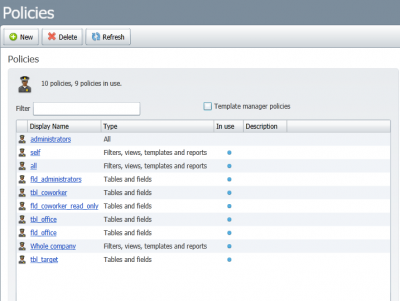
Policies are used in Lime CRM to control the read and write access to lime types and their properties.
Examples:
- Only Adminstrators can create new coworkers.
- Only members of the Finance group can edit the invoice total.
- Members of Sales can read time reports, but only Consultants can create and modify them.
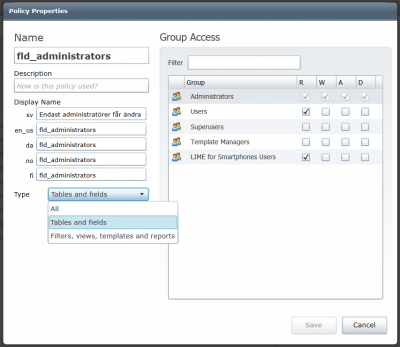
Policies provides the granularity below per user group:
| Denomination | Name | Description |
|---|---|---|
| R | Read | Gives read access to a table or field. Without this access a user cannot see the field or table |
| W | Write | Makes it possible to modify existing data in a table/field |
| A | Add | Makes it possible to add new records in a table |
| D | Delete | Makes it possible to delete records in a table. |
Policies are managed in LISA under the "Security -> Policies" node.
What policies don't protect
The descriptive
The descriptive of a limeobject (_descriptive in the APIs) is built from its property values without checking field policies. A user who may not read a field still sees its value if the field is part of the descriptive.
The descriptive is decided by field labels: firstname and lastname together if the limetype has both, otherwise the first of these labels that the limetype has: name, firstname, lastname, nickname, description, customernumber, companynumber, key, primaryemailaddress, businesstelephonenumber, mobiletelephonenumber, jobtitle, streetaddress, city, category.
For example, with read on coworker.firstname denied, the REST API leaves firstname out of a coworker but returns "_descriptive": "Jane Doe".
Warning
Don't put a read policy on a field that makes up the descriptive. Move the label to another field instead.
Administrators
Members of the Administrators group bypass policies completely, even a policy that denies the Administrators group itself. Test a policy as a user in one of the groups it restricts, not as an administrator.
Desktop client
Additionaly, the Lime CRM Desktop client uses policies to control:
- Filters
- Views
- Templates
- Reports